
This option will copy the Instructional Hours from the previous year to the current year based on the term selected in the Term Selector.
Warning: Running this function multiple times will overwrite the current year data each time.
A list shows the available school(s), previous term, current term, and the prior year’s instructional hours:
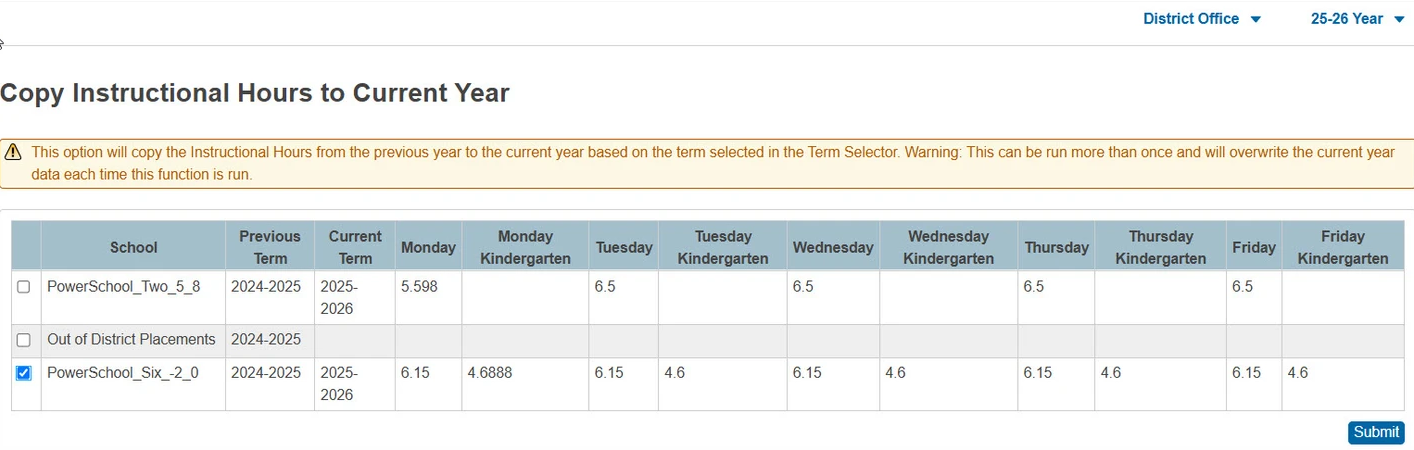
-
Select the school(s) to run the copy. This can be run at the District Office for multiple schools, or at the School level.
-
Click Submit.
-
A warning box appears; click Continue or Cancel.
-
A confirmation box appears indicating the copy has completed.
-
Navigate to School Management > Scheduling > Years and Terms, open the current term year, and verify Instructional Hours.