
The following configuration must be completed in order to request data via SIF.
Enable the Data Exchange (DEX)
To enable SIF, perform the following steps:
-
From the District Office, navigate to Start > System Management > Server> Plugin Configuration.
-
Type DEX in the Filter to narrow the selection to PowerSchool Data Exchange (DEX).
-
Place a checkmark in the box for PowerSchool Data Exchange (DEX) and Enable.
-
Confirm the plugin has been enabled by looking for the green Plugin successfully enabled message.
Note: This is a one time setup.
Create a VA_SIF Profile
Once the plugin has been enabled, create a SIF profile by performing the steps below.
-
Type DEX in the Filter to narrow the selection to PowerSchool Data Exchange (DEX).
-
Click on PowerSchool Data Exchange (DEX) and click ‘Profile Configuration’.
-
Click on Add Profile.

-
Enter VA_SIF for the Profile Name. Select the SIF option for the Profile Type. Verify the profile is ‘On’ and click Save.
Configure the SIF Profile & Test Connection
Once the profile has been created, it must be configured.
-
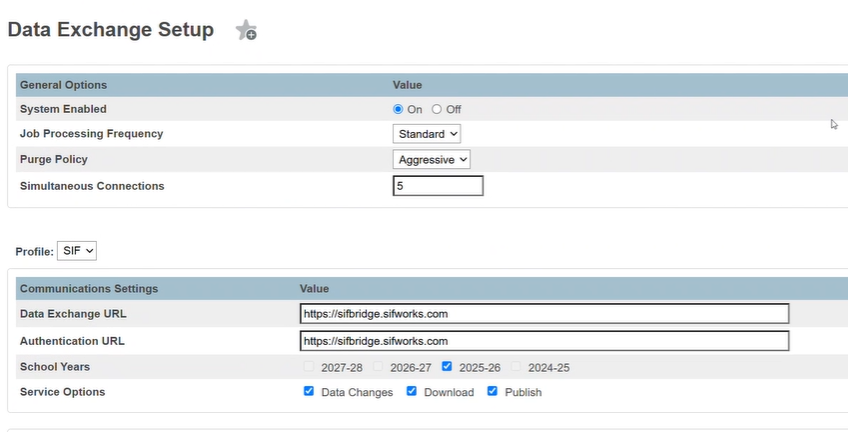
Navigate to System Management > Data Exchange > General Setup
-
Confirm that System Enabled is set to on and the Data Exchange and Authentication URL fields are set with the pre-populated connection values. Make sure School Years has the current school year enabled.
-
Select ‘Configure’ for the LEA listed at the bottom of the page to open the window where your Authentication Key and Authentication Secret will be entered.
-
In this window, set LEA Enabled to On, enter the values received from the vendor into the Authentication Key and the Authentication Secret fields. Click test connection to confirm communication can be established successfully, then save changes. If the connection is not successful, verify that the correct key and secret values have been entered.
-
Once the connection has been saved. Close the window. Verify the LEA status shows “Active” and Save the profile.
For more information regarding the key and secret or student data for SIF, contact steve@loopdataservices.com.